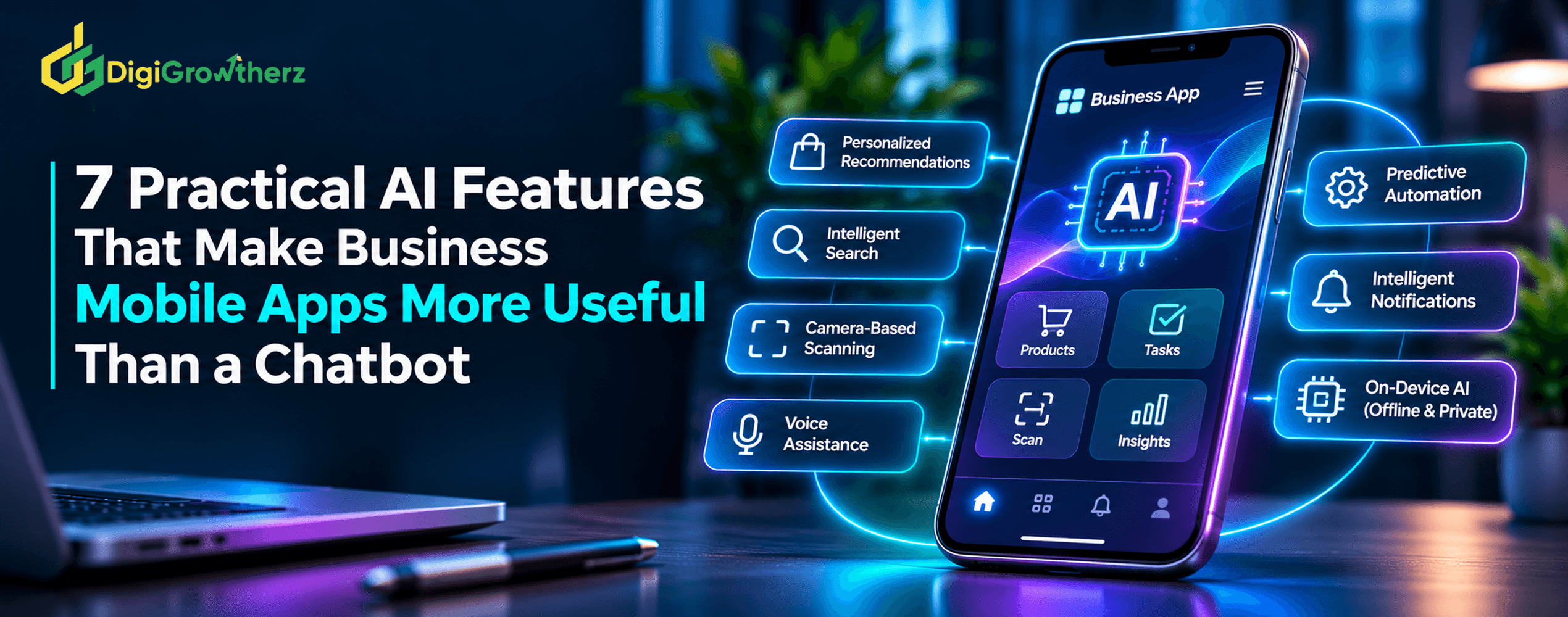
7 Practical AI Features That Make Business Mobile Apps More Useful Than a Chatbot
AI can do much more in a mobile app than answer questions. Discover seven practical features, from intelligent search and camera-based scanning to predictive workflows and personalized notifications, that can improve customer experiences and make business apps more useful.
D
DigiGrowtherz
DigiGrowtherz
A chatbot can answer questions, but is that enough to make a business mobile app genuinely useful?
Today's mobile apps can do much more than provide a conversational interface. Artificial intelligence can help users find information, scan documents, receive relevant recommendations, complete repetitive tasks, and interact with an app through voice or images.
For businesses, the opportunity is not simply to add an AI chatbot. It is to make important app features smarter and reduce the effort customers need to complete everyday activities.
For example, an ecommerce app could recommend relevant products based on customer preferences. A service-booking app could suggest suitable appointment times. A business productivity app could extract information from documents, summarize activity, or prepare tasks for approval.
These capabilities can be integrated directly into the app experience rather than forcing users to describe every request in a chat window.
This guide explores seven practical AI features that can make business mobile apps more useful, explains how they work, and highlights the development, privacy, and performance considerations businesses should understand before implementing them.
Why AI in Mobile Apps Should Be More Than a Chatbot
A chatbot is one way to interact with AI, but it is not the only way to use it.
7 Practical AI Features That Make Business Mobile Apps More Useful Than a Chatbot | DigiGrowtherz
A conventional chatbot usually requires someone to open a conversation, explain what they need, and interpret the response. That can be useful for customer support and general assistance, but it may introduce unnecessary steps when the user simply wants to scan an invoice, find a product, or complete a task.
Mobile apps have access to capabilities that can support more direct interactions, subject to platform permissions and user consent.
These include cameras, microphones, device notifications, local storage, location services, and other platform features.
AI can use these capabilities to make existing app functions more intelligent.
Consider the difference:
Chatbot-focused experience
AI-enhanced app experience
User asks where to find a product
App understands a search request and displays relevant products
User manually enters document details
App scans a document and extracts information
User asks for a reminder
App identifies a relevant upcoming task and offers a reminder
User describes a long conversation
App produces a concise summary
User searches through multiple records
App retrieves information based on meaning
The second approach does not eliminate the need for chat. It places AI where it can help users complete specific activities more efficiently.
7 Practical AI Features for Business Mobile Apps
1. Personalized Recommendations and Context-Aware Experiences
Personalization helps an app present information that is more relevant to each user.
Instead of displaying exactly the same products, services, content, or shortcuts to everyone, an app can use appropriate context and user preferences to organize the experience.
For example, an ecommerce app might recommend products based on:
Previously viewed products.
Purchase history.
Selected product categories.
Explicitly saved preferences.
Current search activity.
A business service app could highlight frequently used services, relevant account information, or useful next steps based on the customer's previous interactions.
AI can help identify patterns in these interactions and generate recommendations that are more flexible than simple fixed rules.
Practical business example
Imagine a customer using a clothing store's mobile app.
After browsing sportswear, the app may highlight related shoes, accessories, and new arrivals. If the customer frequently searches for a particular category, the app could make that category easier to access.
The recommendations should remain relevant and should use accurate product information from the store's database.
Personalization may help improve product discovery, reduce unnecessary navigation, and encourage customers to explore relevant offerings.
However, recommendations should be measured through meaningful outcomes such as product discovery success, add-to-cart activity, completed purchases, and customer feedback.
More recommendations do not automatically mean more sales.
2. Intelligent Search and Product Discovery
Traditional mobile app search often depends on exact keywords.
For example, someone searching for "wireless headphones" may not find a product described primarily as "Bluetooth audio accessories," even though the item is relevant.
AI-powered search can help interpret the meaning behind a query rather than relying only on exact word matching.
This can be implemented through semantic search, which represents content as numerical embeddings and compares the meaning of a search query with available information.
For example, a customer could search:
"I need a lightweight laptop for university."
An intelligent search system could consider relevant product information such as weight, category, specifications, and documented use cases.
AI search can also help users discover information inside:
Product catalogs.
Service listings.
Customer support articles.
Business documents.
Internal knowledge libraries.
Account records that the user is authorized to access.
Google's Android ML Kit documentation describes embedding capabilities that can help developers find content based on meaning, including integration with AndroidX AppSearch.
Intelligent search can make large catalogs and information libraries easier to navigate.
It is particularly useful for ecommerce apps, marketplaces, service directories, and business platforms containing many records.
A practical implementation should still include filters, sorting, and conventional search. AI search can occasionally misunderstand an inquiry, so users should have a clear way to refine results.
3. Camera-Based Scanning and Document Intelligence
A mobile phone camera can become a useful business tool when combined with AI and computer vision.
Instead of requiring users to manually enter information from physical documents, the app can analyze an image, recognize relevant information, and prepare structured data.
Practical examples include:
Scanning invoices and extracting supplier information.
Reading receipts and preparing expense records.
Scanning product barcodes.
Recognizing text from documents and forms.
Identifying products from images.
Scanning QR codes to retrieve relevant records.
Consider a business expense management app.
An employee photographs a receipt. The app recognizes the merchant name, date, total, and other relevant information, then prepares an expense entry.
The employee checks the extracted information and confirms it before submission.
This approach can reduce manual data entry, but the extracted information must be validated. Image recognition and OCR can make mistakes when documents are blurry, damaged, poorly lit, or incorrectly formatted.
Apple's Vision framework provides image-analysis capabilities such as text recognition, barcode detection, and image classification. Apple's documentation also describes on-device processing for text recognition, including offline use cases.
Camera-based AI can be particularly valuable in logistics, retail, finance, field services, inventory management, and document-heavy workflows.
It can reduce repetitive input while making mobile devices useful for capturing information directly at the point where work happens.
4. Voice-Based Interaction and Multilingual Assistance
Typing is not always the most convenient way to interact with a mobile app.
Users may be driving, working in the field, handling physical products, or simply prefer speaking instead of typing.
AI-powered voice features can support natural spoken interactions through speech recognition, speech-to-text, translation, and text-to-speech.
For example, a field-service employee could dictate a job update instead of typing it manually. An international customer could speak in one language and receive translated text. A user with accessibility needs could listen to selected app content.
Practical applications include:
Voice search.
Spoken form input.
Speech-to-text notes.
Real-time translation.
Spoken instructions.
Text-to-speech responses.
Voice-assisted navigation.
Google's ML Kit GenAI documentation describes on-device speech recognition, speech translation, and text-to-speech capabilities. Actual feature availability depends on the supported devices, platform, and API requirements.
Voice assistance can reduce typing effort and improve accessibility, especially in applications where users are frequently away from a desk.
However, voice features require careful handling of microphone permissions, background audio behavior, and potentially sensitive recordings.
Users should understand when audio is being captured and whether processing occurs locally or through an external service.
5. Predictive Assistance and Workflow Automation
Many business apps contain repetitive actions that users perform every day.
AI can help identify patterns, prepare information, and suggest the next useful action.
This is where mobile apps can become more than tools for viewing information. They can actively help users complete business processes.
Examples include:
Preparing a follow-up task after a customer interaction.
Suggesting a suitable appointment slot.
Identifying incomplete application forms.
Categorizing new support requests.
Preparing a draft response to a customer inquiry.
Highlighting unusual activity for review.
Suggesting the next step in an order or service workflow.
Practical business example
Imagine a CRM mobile app used by a sales team.
After a sales representative completes a customer call, AI could summarize the notes, identify potential follow-up actions, and prepare a reminder.
The employee reviews the suggestions and confirms which tasks should be created.
The workflow becomes more efficient without allowing AI to make every decision independently.
Predictive assistance may reduce administrative work, improve consistency, and help employees stay on top of important activities.
However, suggestions should be distinguishable from confirmed facts. Financial transactions, customer account changes, contractual actions, and other consequential operations should use explicit authorization and appropriate human approval.
6. Intelligent Notifications and Proactive Reminders
Mobile notifications are useful when they deliver information at the right time.
However, many apps send generic promotional messages or reminders that do not match the user's interests or current activity.
AI can help prioritize relevant notifications by considering appropriate signals such as task status, user preferences, deadlines, and recent app activity.
For example:
A booking app reminds a customer about an upcoming appointment.
A project management app highlights a task approaching its deadline.
An ecommerce app notifies a customer about a saved item's relevant update.
A service app provides an important status notification when an order changes.
A finance app highlights an unusual transaction for review.
The goal is to make notifications useful and timely rather than sending more messages.
Important implementation considerations
Notifications should respect user settings and platform permissions.
Apple requires apps to request authorization for notification interactions such as alerts, sounds, and badges. Its guidance recommends requesting permission in a context that helps users understand why notifications are useful.
Businesses should provide notification preferences, avoid unnecessary frequency, and allow users to control which types of updates they receive.
Business benefits
Relevant notifications can help users return to important tasks, stay informed, and complete activities on time.
Success should be measured through useful outcomes such as completed tasks, appointment attendance, and notification opt-outs—not simply the number of messages delivered.
7. On-Device AI for Offline and Privacy-Conscious Features
One of the most useful developments in mobile AI is the ability to run certain machine learning tasks directly on a device.
Instead of sending every request to a remote server, the application can perform selected AI operations locally.
This can help support features such as:
Summarizing short content.
Rewriting or proofreading messages.
Recognizing text in images.
Categorizing images.
Performing selected language tasks.
Processing information when network access is unavailable.
For example, a field-service app could allow an employee to capture a document and extract text even when the internet connection is unreliable.
Apple's Core ML framework is designed to run machine learning models using device hardware, including the CPU, GPU, and Neural Engine. Apple describes on-device inference as an approach that can reduce the need for network connectivity and help protect user data.
Android also provides on-device capabilities through ML Kit and Gemini Nano-based GenAI APIs on supported devices. The available APIs and compatible hardware vary by feature and device.
Business benefits
On-device AI can reduce network dependency, support faster local processing, and keep certain information on the user's device.
However, it is not suitable for every task.
Large models can consume device memory, storage, battery, and processing resources. Older devices may not support the required capabilities, and on-device models may offer different levels of quality compared with cloud-based systems.
A hybrid approach can work well: use local AI for suitable everyday operations and a secure backend when a task requires larger models, shared business data, or centralized processing.
On-Device AI vs Cloud-Based AI: Which Approach Should Businesses Choose?
Choosing where AI runs is an important part of mobile app architecture.
Both approaches have advantages and limitations.
Factor
On-device AI
Cloud-based AI
Internet connection
Some features can work offline
Usually requires connectivity
Data processing
Selected processing stays on the device
Data is sent to a remote service
Performance
Can be responsive without network latency
Depends on network and server response
Model capability
Limited by device hardware and available models
Can access larger hosted models
Device requirements
May require compatible hardware
More processing happens remotely
Maintenance
Model and app compatibility must be managed
Backend services and provider changes must be managed
Privacy
Can reduce data transmission
Requires appropriate data handling and provider controls
Neither approach is automatically better.
For example, an image-scanning feature may work well with on-device processing, while a complex recommendation system that needs shared product and business data may be more suitable for server-side processing.
The decision should be based on the task, privacy requirements, device support, performance expectations, and ongoing operating costs.
A hybrid architecture often provides a practical balance.
Privacy and Security Considerations for AI Mobile Apps
Mobile AI features may process information from cameras, microphones, location services, customer accounts, documents, and app activity.
Businesses should decide what information is necessary before collecting or processing it.
Request permissions only when needed
A camera feature should request camera access when the user chooses to scan something, not automatically when the application launches.
Similarly, microphone permission should be requested when the user activates a voice feature.
Apple and Android both provide platform guidance for requesting permissions in context and explaining why access is necessary.
Explain how information is used
Businesses should make it clear whether information is processed locally, sent to a cloud AI provider, stored on a server, or shared with another service.
The privacy policy and in-app disclosures should accurately explain relevant data collection, usage, retention, and sharing.
For iOS apps, Apple requires developers to provide accurate App Privacy information, including data practices associated with third-party SDKs.
Protect stored and transmitted information
AI features should follow the same security standards as the rest of the application.
Use appropriate authentication, authorization, encryption, secure storage, and API protection. Avoid exposing credentials or sensitive business information in client-side code.
AI-generated suggestions should not automatically become completed business transactions.
Require confirmation for actions such as issuing refunds, changing account details, submitting orders, sending sensitive communications, or making important business decisions.
The application backend should enforce permissions and business rules rather than relying on AI instructions alone.
How to Choose the Right AI Features for Your Business App
Not every business needs all seven features.
The right selection depends on the app's purpose, customer needs, available data, budget, and technical requirements.
A useful starting point is to evaluate potential features against four questions.
Does it solve a real user problem?
Choose features that remove friction from an existing customer journey or business process.
Does it fit naturally into the app?
AI should make an existing task easier rather than forcing users to learn a complicated new interface.
Can the business support it?
Consider integration requirements, model costs, device compatibility, maintenance, privacy, and ongoing testing.
Can its results be measured?
Define what success looks like before development begins.
Useful measurements may include task completion rate, time required to complete an activity, search success, recommendation engagement, customer satisfaction, and support workload.
For features involving AI-generated responses or recommendations, also measure accuracy, correction rates, and the frequency of human intervention.
A Practical Implementation Roadmap
Businesses can reduce development risk by introducing AI features gradually.
Step 1: Identify the highest-value use case
Review customer feedback, support requests, app analytics, and business workflows.
Choose one problem with a clear objective, such as reducing manual document entry or improving product discovery.
Step 2: Select the appropriate AI approach
Evaluate existing machine learning APIs, hosted AI services, custom models, and on-device capabilities.
Avoid building a complex custom system when an existing platform can handle the task reliably.
Step 3: Design the user experience
Decide where the feature belongs in the application.
For example, document scanning should be available near the relevant form or transaction, while personalized recommendations should appear where users naturally explore products.
Keep the main workflow understandable even when AI is unavailable.
Step 4: Build privacy and security into the architecture
Determine what data the feature needs, where processing occurs, how information is stored, and which users or systems can access it.
Use secure backend validation and appropriate human approval for sensitive actions.
Step 5: Test across real devices and conditions
Test on supported device models, different network conditions, and realistic usage scenarios.
Pay attention to processing time, battery consumption, memory usage, app startup, and error handling.
A feature that performs well on a recent flagship phone may not provide the same experience on older or lower-powered devices.
Step 6: Launch with measurable objectives
Begin with a controlled release or limited feature rollout.
Compare actual results with the previous user experience. Use feedback and performance data to decide whether to improve, expand, or remove the feature.
For additional evaluation, Firebase supports A/B testing of in-app message variations for Android and iOS applications, allowing developers to compare different experiences against selected objectives.
Conclusion: Build Mobile Apps That Help Users Get Things Done
AI can make business mobile apps more useful in many ways beyond a conversational chatbot.
Personalized recommendations, intelligent search, camera-based document scanning, voice assistance, predictive workflows, relevant notifications, and on-device AI can all help users complete everyday activities more conveniently.
However, the value of these features depends on how well they fit the application. They must be reliable, secure, accessible, and appropriate for the devices customers actually use.
Businesses should not add AI simply to make an app appear more advanced. They should identify a genuine user problem, choose the simplest suitable technology, and measure whether the feature delivers a meaningful improvement.
The strongest AI-enabled mobile apps are not necessarily the ones with the most AI features. They are the ones that use AI to make important tasks easier, faster, and more useful for their customers.
Planning a new mobile app or considering AI integration into an existing application? Explore DigiGrowtherz services or contact the team to discuss your business requirements.